
How Do Digital Assets Self-Custody? OpenAI Cofounder's 15-Step Checklist

Original Title: How to stay digitally secure in the Age of Claude Mythos (using Karpathy's 15-step checklist)
Original Author: Ole Lehmann
Translation: Peggy, BlockBeats
Editor's Note: As AI capabilities begin to approach the boundary of a "general tool," the meaning of cybersecurity is also changing. It is no longer just a defense issue against hackers, viruses, or data breaches but is evolving into a game of "asymmetric capabilities."
With Anthropic's introduction of Claude Mythos showcasing top-level expert-like vulnerability discovery, network attacks are entering a more covert and automated new stage, and individual security is transitioning from being an "option" to a "necessity." On one hand, the attack threshold is being lowered, and on the other hand, attack efficiency is exponentially increasing. This means that "passive security" will become increasingly unsustainable.
In this context, OpenAI co-founder Andrej Karpathy's proposed "digital hygiene" checklist offers an actionable response path. In the AI era, security is no longer just a "remedy after an incident" but part of "daily behavior." Identity verification, permission isolation, information minimization, and habit reformation. The seemingly trivial 15 steps essentially reconstruct a security boundary that an ordinary user can control.
The true risk lies not in whether you are a target of an attack but in whether you are defenseless when an attack occurs.
The following is the original text:
What can be certain is that when it comes to cybersecurity, you no longer have room to be lazy.
The milestone Mythos released by Anthropic yesterday marks a point of no return.
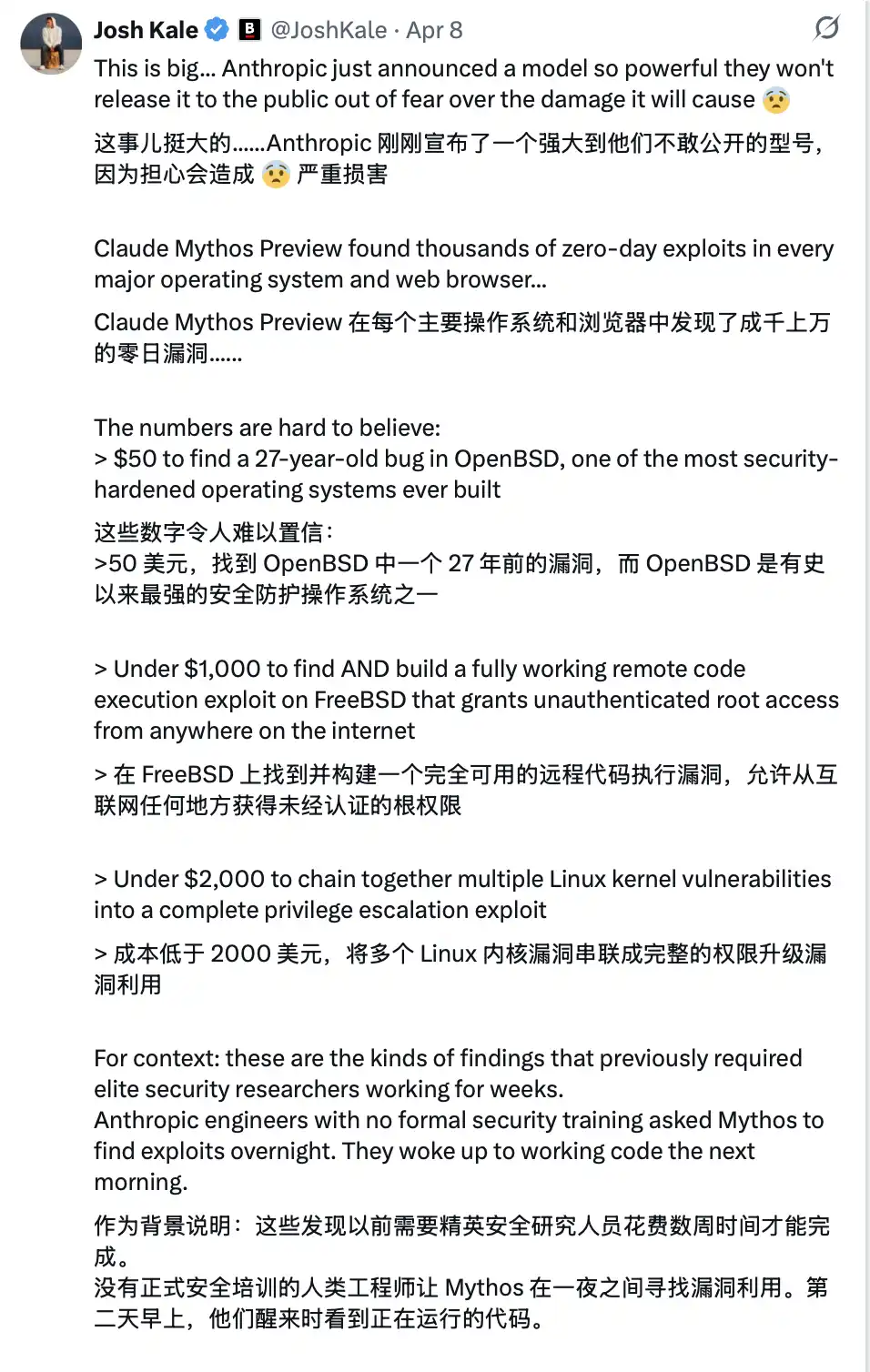

This technology is not yet public, but once it falls into the hands of malicious actors (which is almost inevitable)... you will face an extremely advanced cyberattack, with most people realizing it is too late even before they are aware they have been breached.
It's like the "COVID-19 of the software world."
It is for this reason that from now on, your cybersecurity must be watertight.
Karpathy's Digital Hygiene Guide
Last year, Andrej Karpathy (@karpathy, Co-Founder of OpenAI) compiled a "Digital Hygiene Guide," systematically outlining foundational methods to protect oneself in the AI era.
This is one of the most worthwhile introductory guides I've come across.
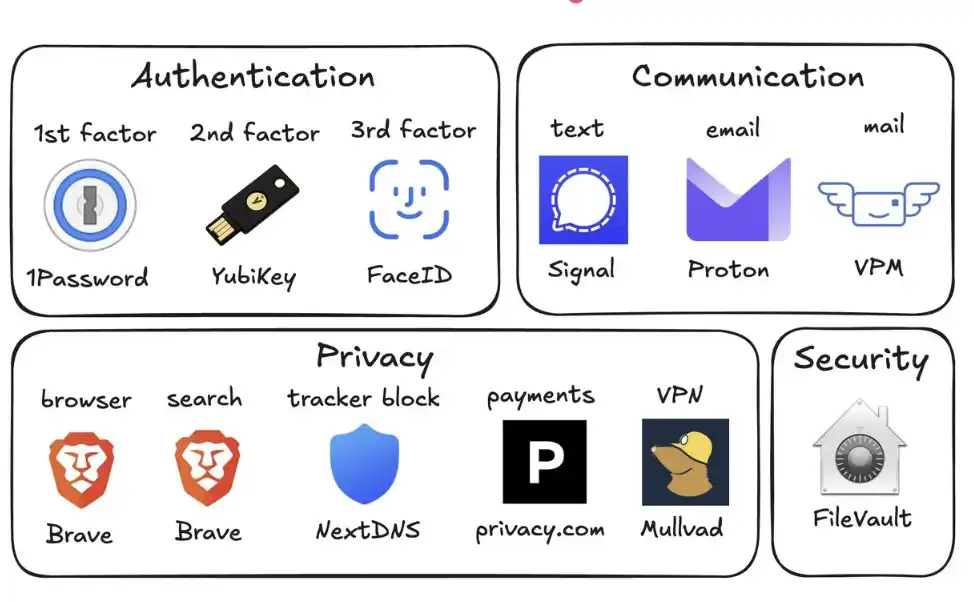
Here are all the security measures you should take in this era of uncertainty:
1. Use a Password Manager (e.g., 1Password)
Generate a unique random password for every account you own. Once a service is breached, attackers often use these account passwords for credential stuffing. A password manager can completely mitigate this risk and can even autofill, making it faster in practice than reusing passwords.
2. Set Up Hardware Security Keys (e.g., YubiKey)
This is a physical device that serves as the second factor for logging in. Attackers must "have the physical key" to access your account. In contrast, SMS codes are easily stolen through SIM-swapping attacks (where someone impersonates you to the carrier to transfer your number to their phone).
It is recommended to purchase 2–3 YubiKeys, keep them in different places to prevent being locked out of your accounts if one is lost.
3. Enable Biometrics Everywhere
For example, Face ID, fingerprint recognition, etc., should be enabled in password managers, banking apps, and critical apps. This is the third layer of authentication: "you" yourself. No one can steal your face from a database.
4. Treat Security Questions as Passwords
Questions like "What is your mother's maiden name?" can be found online in 10 seconds. You should generate a random answer and store it in your password manager. Never provide real information.
5. Turn On Disk Encryption
On Mac, it's called FileVault; on Windows, it's BitLocker. If your computer is stolen, encryption ensures that all the thief gets is a "brick" instead of all your data. Enabling this takes only 2 minutes and runs automatically in the background.
6. Reduce Smart Home Devices
Every "smart device" is essentially a connected computer with a microphone. They continuously collect data, connect to the internet frequently, and are often compromised. Your smart home air quality monitor doesn't need to know your exact location. The fewer the devices, the fewer the attack vectors.
7. Use Signal for Communication
Signal provides end-to-end encryption, preventing anyone (including the platform itself, your carrier, eavesdroppers) from reading the content. Regular SMS and even iMessage retain metadata (who, when, frequency of contact). Enable "Disappearing Messages" (e.g., 90 days) to avoid retaining history as a risk.
8. Use Privacy-Focused Browsers (e.g., Brave)
Based on Chromium, compatible with Chrome extensions, offering a nearly identical user experience.
9. Switch Default Search Engine to Brave Search
It has its own index (unlike DuckDuckGo, which relies on Bing). If a search result is unsatisfactory, you can add "!g" to switch to Google. The paid version, around $3 per month, is worthwhile — you become a customer, not the "product being sold."
10. Use Virtual Credit Cards (e.g., Privacy.com)
Generate a unique card number for each merchant and set spending limits. You can even provide random names and addresses. If a merchant is compromised, only the disposable card number is exposed, not your real financial identity.
11. Use a Virtual Mailing Address
Services like Virtual Post Mail will receive your physical mail, scan the contents, and allow you to view them online.
You can decide which items to discard and which to forward. This way, you don't have to give your real home address to various unknown retailers every time you check out online.
12. Do Not Click on Links in Emails
Email addresses are extremely easy to spoof. With the help of AI, today's phishing emails are almost indistinguishable from real ones. Instead of clicking on links, manually enter the website address and log in.
At the same time, disable the automatic image loading feature in your email, as embedded images are often used to track if you've opened the email.
13. Selectively Use a VPN (e.g., Mullvad)
A VPN (Virtual Private Network) can hide your IP address (the unique identifier of your device and location) from services you access. It doesn't need to be on all the time, but make sure to use it when on public Wi-Fi or accessing less trusted services.
14. Set Up DNS-Level Ad Blocking (e.g., NextDNS)
DNS can be thought of as a device's "phone book" for looking up websites. Blocking at this level means ads and trackers are stopped before they even load.
And it works for all apps and browsers on your device.
15. Install Network Monitoring Tools (e.g., Little Snitch)
It shows you which apps on your computer are connecting to the internet, how much data they're sending, and where the data is headed. Any app with an abnormally high "phone home" frequency should raise a red flag and likely be uninstalled.
Currently, Mythos remains solely in the hands of the defense side of Project Glasswing (such as Anthropic, Apple, Google, etc.). However, models with similar capabilities will soon fall into the hands of malicious actors (possibly within 6 months or even sooner).
That's why it's crucial to shore up your security defenses now. Spending 15 minutes to complete these settings can help you avoid a host of serious issues in the future.
Stay secure, and wishing you all the best.
You may also like

Will MicroStrategy fall into a death spiral? What will the macro trend be in the second half of the year?

Blockchain Capital Partner: The Core Secret of Arbitrage

STRC unanchored by 11%, can the perpetual motion machine of Strategy still operate?

Bitcoin Market Analysis 2026: Can BTC Reach $150K by Year-End?

Bitcoin ETF Outflows Hit a Record $4.4 Billion: What Are Traders Doing With Their Cash?

WEEX App Just Got Smarter – New Tabs for Faster Trades & Easy Asset Management

WEEX All-New Search Features: Find, Trade & Earn Faster Than Ever

Morning Report | Illinois signs the strictest digital asset tax law in the U.S.; RWA tokenization market size surpasses $43 billion, institutions accelerate the migration of on-chain assets

Full version of the debut Q&A! Federal Reserve Chairman Waller: Sticking to the 2% inflation target, establishing five special working groups, individual did not submit the dot plot

From Disruptor to Shadow Market: The Crypto Market is Becoming a Colony of Traditional Finance
Dalio's important long article: How to position in the current market environment?
OKX Star analyzes Binance's competitive advantages: when regulation levels the playing field, competition has just begun

New gameplay for participating in initial offerings on cryptocurrency exchanges
Why Is Bitcoin Down Today? What the Hawkish FOMC Means for SpaceX, Gold and Nasdaq

DeepSeek Financing Story

Morning Report | DeepSeek completes over $7 billion in financing, with a valuation exceeding $50 billion; Musk's personal wealth has surpassed the total market value of Bitcoin

Cursor, why did you get on Musk's spaceship?
In the name of charity, for the benefit of the family: How the Trump family turned charity into profit?
Will MicroStrategy fall into a death spiral? What will the macro trend be in the second half of the year?
Blockchain Capital Partner: The Core Secret of Arbitrage
STRC unanchored by 11%, can the perpetual motion machine of Strategy still operate?
Bitcoin Market Analysis 2026: Can BTC Reach $150K by Year-End?
Bitcoin ETF Outflows Hit a Record $4.4 Billion: What Are Traders Doing With Their Cash?
WEEX App Just Got Smarter – New Tabs for Faster Trades & Easy Asset Management


